
Det er påkrævet, at du allerede ejer Symphony of War: The Nephilim Saga på Steam for at kunne bruge Symphony of War: The Nephilim Saga - Legends.

Det er påkrævet, at du allerede ejer Symphony of War: The Nephilim Saga på Steam for at kunne bruge Symphony of War: The Nephilim Saga - Legends.
Return to Tahnra once again in a DLC seamlessly integrating into the story campaign, bringing new strategic options and a completely new army meta. Enjoy eight new story chapters, tons of new artifacts, traits, and classes, and a massive New Game+ mode!
Eight new chapters concurrent with existing chapters, expanding upon the stories of your favorite characters and factions to finish out their storylines.
New Game+, allowing you to retain aspects of the beloved army you’ve built up over a playthrough. Experience the campaign once again, this time with the world tailored for a different challenge!
Thirteen new Unit classes, expanding your army-building options even more, such as the powerful shield specialist Oracle, or the highly mobile Field Cannon.
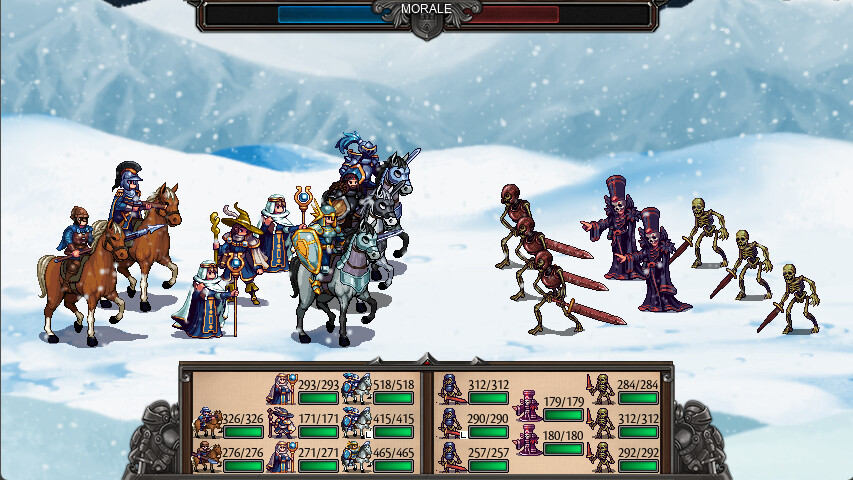
A completely new army meta enters the battlefields of Tahnra - necromancy and the undead! Who needs prisoners of war when you can raise armies of ghoulish minions? Raise your own army from the grave and combat other undead legions in the DLC chapters!
Scores of new artifacts, items, traits, and Unique Mercenaries to further customize and enhance your army.
You may have experienced Symphony of War, but are you ready to become a Legend?
© Dancing Dragon Games & Freedom Games - All Rights Reserved.
Game URL: Http://www.dancingdragongames.com
All website content is ©dancingdragongames.com
Redistribution or altering of any of the content of Symphony of War is strictly prohibited. The materials included in this game are only to be used to play Symphony of War. All graphic and scripting resources have the expressed written consent of their contributors as listed in the credits.
Hvordan virker det? Modtager jeg Symphony of War: The Nephilim Saga - Legends fysisk?
Nej, du modtager en Symphony of War: The Nephilim Saga - Legends produktnøgle (Symphony of War: The Nephilim Saga - Legends CD Key), som du modtager via e-mail. Du skal derefter bruge Steam-platformen til at indløse din Symphony of War: The Nephilim Saga - Legends produktnøgle (Symphony of War: The Nephilim Saga - Legends CD Key), og du er derefter klar til downloade, installere og spille Symphony of War: The Nephilim Saga - Legends. Ved køb af spillet, modtager du samtidig en vejledning til hvordan dette gøres, hvis du skulle være i tvivl. Så bliver det ikke nemmere!
Enter Tahnra, a land savaged by war. You, a fresh academy graduate with humble beginnings, will grow to lead a grand army against a corrupt adversary. Gather heroes, form bonds, and lead your force in turn-based battles. Make use of tactics, terrain, morale and more to bring peace to the land!
Der er i øjeblikket ingen anmeldelser
Playcoins er vores smarte pointsystem, der belønner vores mest trofaste kunder. Vi elsker jer, og har derfor besluttet os for at give noget tilbage!
Hver gang du køber noget i vores shop, bliver du belønnet med Playcoins.
Køber du eksempelvis for 200 kr, får du 200 Playcoins tilføjet til din konto. Værdien af disse Playcoins er 2% af købsbeløbet, så hver gang du køber, får du reelt set 2% tilbage!
Næste gang du foretager et køb i shoppen, kan du så bruge dine Playcoins til at få rabat. Det er ligesom de siger… penge er godt, men gratis penge er dobbelt så godt.
Video-vejledning her
Hent og installér Steam her ved at klikke på den grønne knap der hedder "Installér Steam". Dette vil downloade et program til at installere Steam på din computer. Kør dette program, og følg dets vejledning til at installere Steam.
Når Steam er installeret, og du starter det op for første gang, vil du blive bedt om at oprette en Steam-konto, eller logge ind på en eksisterende Steam-konto. Vær opmærksom på, at alle produktnøgler du indløser bliver bundet til en konto, og kan ikke bruges igen, så det er vigtigt at du husker login-informationen til denne konto!
Når du er logget ind i Steam, vælger du fanen "Spil" i den helst øverste bjælke, hvor "Spil" kan findes mellem "Venner" og "Hjælp". Der vil komme en menu frem, hvor du skal vælge punktet "Aktivér et produkt på Steam". Følg vejledningen der kommer frem, og indtast din produktnøgle, når Steam beder om den. Produktet vil nu være tilføjet til din konto, og er klar til at blive hentet.