 Kontakt
  Infocenter
  Log ind
  0 Indkøbskurv Indkøbskurv Indkøbskurv
 Ingen varer
0 Spil til en total pris af: 0,00 kr.

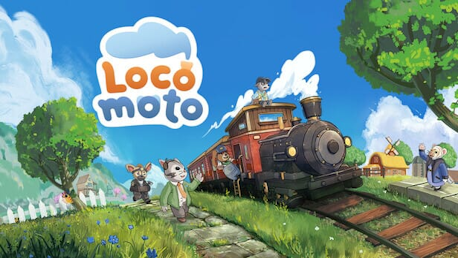
Locomoto (PC)

This is Locomoto:
Step into the Conductor’s Boots - Create your very own character and express your style with a range of charming outfits. Be the train conductor you want to be!
Build the Train of Your Dreams - Customise everything from wagon types to paint colors, and design a cosy, personalised interior your passengers will love.
Meet Delightful Locals - Stop at enchanting little stations, lend a hand to friendly locals, and welcome them aboard. Serve up steaming cocoa, delicious pies, and share heartwarming moments along the way.
Uncover a Rich, Meaningful Story - Explore the secrets of your hometown and discover the environmental challenges it faces.
Do Satisfying Chores - Recycle in exchange for tokens, chop wood or mine ores to create a variety of furniture, serve your passengers with pie or a drink, take a fishing break and hang your catch on your train wall!

Pick up passengers and board them onto your train. Fuel up with coal, choose a destination, and take off! Keep your passengers happy during the journey by chatting or serving them a treat. Arrive at the destination, collect your coins, clean up, and maybe add a new seat for the next trip!

Leave your train to gather resources and craft furniture in a variety of styles and colors. Expand your train with new wagons to increase storage and passenger space. Unlock outfits for your conductor to further express yourself and your style!

Use your train to travel to new places, explore them, and meet some quirky inhabitants. Get to know them, help them with their problems, and progress through the game's main story to save your hometown Barrenpyre from its dire environmental struggles.
Locomoto™
© 2024 AMPLIFIER™ STUDIOS AB. Locomoto™ is published and developed by Green Tile Digital AB and Amplifier™ Studios AB. All related rights, titles, trademarks, logotypes, and copyrights used in Locomoto™ are the exclusive property of and are controlled by Amplifier™ Studios AB unless specifically stated otherwise. All rights reserved. All related other marks, trademarks, logos, and copyrights are the exclusive property of their respective owners. All rights reserved.
Hvordan virker det? Modtager jeg Locomoto fysisk?
Nej, du modtager en Locomoto produktnøgle (Locomoto CD Key), som du modtager via e-mail. Du skal derefter bruge Steam-platformen til at indløse din Locomoto produktnøgle (Locomoto CD Key), og du er derefter klar til downloade, installere og spille Locomoto. Ved køb af spillet, modtager du samtidig en vejledning til hvordan dette gøres, hvis du skulle være i tvivl. Så bliver det ikke nemmere!
Customise and manage your train, tend to quirky passengers, gather resources, craft decorations, and upgrade your conductors style all accompanied by soft lo-fi tunes. Become a conductor and save your hometown Barrenpyre from environmental disaster!
Der er i øjeblikket ingen anmeldelser